
Features
Five apps. One place for every job.
JobsViz is one SharePoint package with five everyday apps, and a setup wizard that installs it with you. Put the apps on the pages your people already use, in SharePoint or in Teams, and add Leads, Estimating, Forms, the Form Builder and Weather when you want them. Leads and Estimating come with apps of their own.
Home for every client, contract and job
Start on the jobs you manage, or every client. Open a client to see its contracts beside their jobs; open a job for its own page.
- By client, by industry or on a map, in a list or as picture cards, in your own order
- Find any client, contract or job as you type, with your recent jobs one click away
- Views like SharePoint list views, with columns, sorting, filters with [Me] and [Today], grouping, table, compact or cards. There are shared views from admins, personal views for everyone
- Every list works like a spreadsheet: select a heading to sort (Shift for a second sort), or use its menu to group, filter by value, total (sum, average, min, max, count) or hide a column; save the result as your own view
- Export exactly what you see to CSV or a real Excel workbook, groups and totals included
- Colour rules like conditional formatting, and bulk changes: tick several jobs to change their status or manager at once (admins), or several issues to resolve or snooze them
- Every list works fully from the keyboard and with screen readers
- Resize, move and freeze columns, group dates by month, quarter or year, and copy or print any list
- Update the Schedule of Values in the list: type an Earned % (progress billing counts partly earned lines) or pick a WBS code, one line or many at once, with Undo
- A job's page: details, a Weather tab with today's weather and the forecast, schedule of values with budget and earned totals, documents, forms, daily log, equipment, calendar, Planner plan, Teams channel and site access
- WBS codes: the CSI MasterFormat divisions included (or import your own levels), on schedule of values and change order lines, and a WBS tab on each job adding up budget, earned and changes by division. Each job's manager picks the codes that job uses, from defaults set for each job type
- A client's own site and Teams team one click away, from the client's card or page
- One team per client: each job gets its own library on the client's site and its own channel in the client's Teams team, with the job's documents as a tab in that channel
- A contract's page: its number, value, dates and scope, and its jobs
- On a client's or job's own site, the Job Hub shows just that client or job
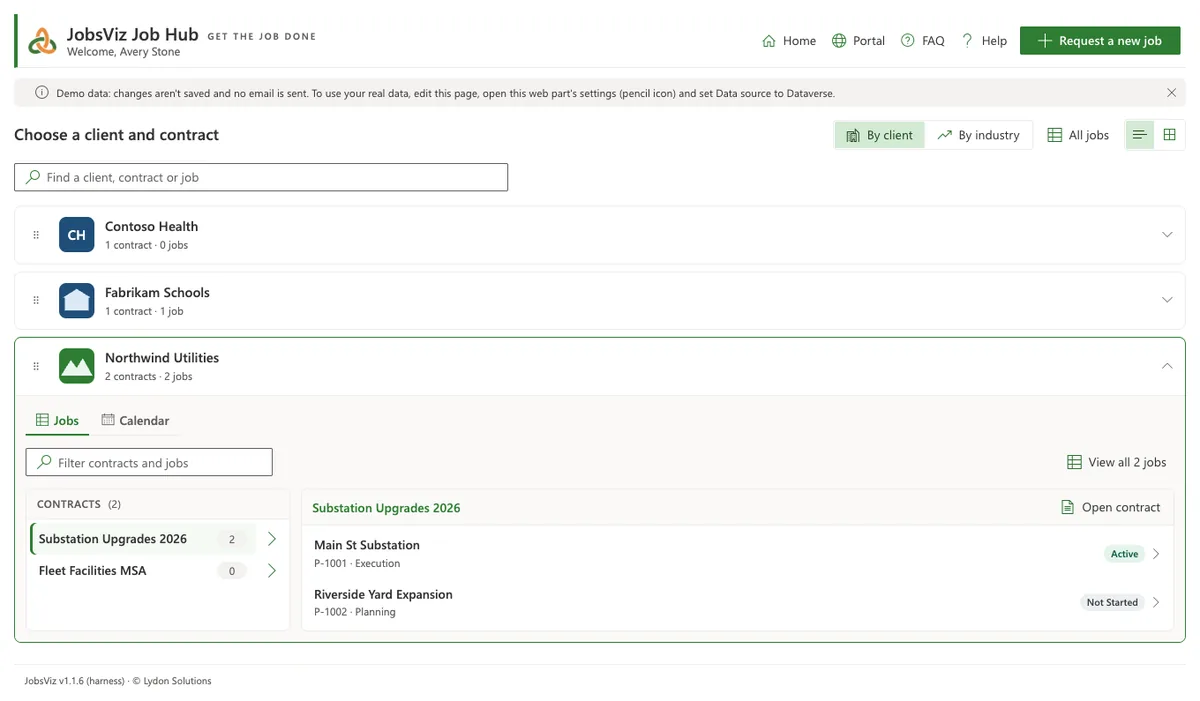
Each job's library, right in the app
Browse a job's SharePoint library as an Explorer with a folder tree, or as a simple list. Everything runs with your own SharePoint permissions.
- Preview files in the app; open in the browser or the desktop app
- Upload any size, drag files onto a folder, and drag to move
- Copy, move, rename, download several as a zip, or delete to the recycle bin
- Share and manage access with SharePoint's own sharing window
- Copy a link that opens the exact folder or file in JobsViz
- Add to my OneDrive or Sync to work on files from your computer
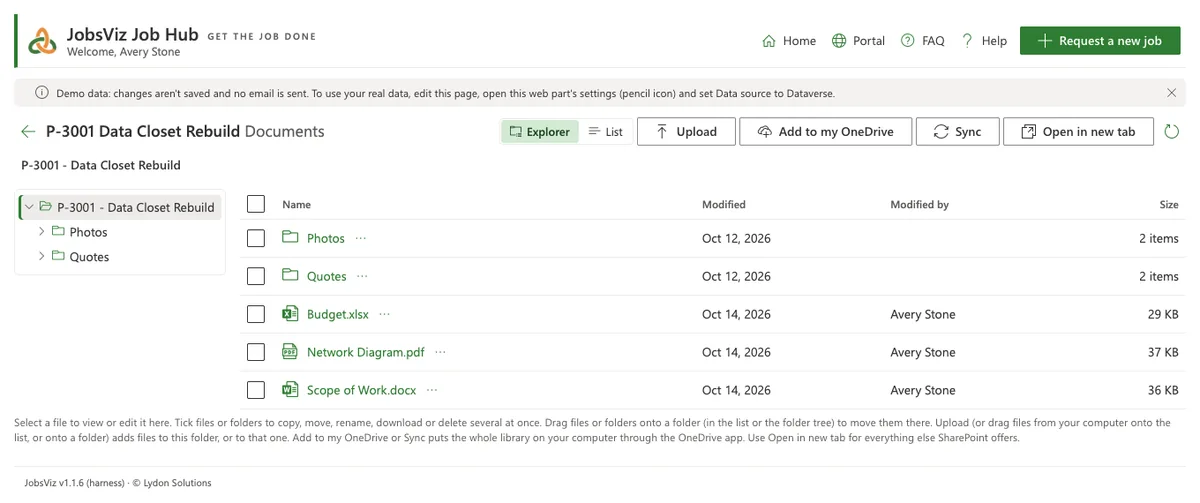
Every lead, from first call to a bid
Keep every enquiry in one place: who it's from, where it came from, what it's worth, how likely you are to win it and when to follow up next. The JobsViz Leads app shows your pipeline as a list or a board.
- Follow-ups due at the top, and Add to Outlook so follow-ups land in your own calendar
- A board you drag leads across as they move from new to qualifying to a go/no-bid decision, or a list with views, totals and export
- Figures at a glance for open leads, pipeline value, value weighted by probability and follow-ups due
- A new lead from an email: send it to a Teams channel's email address, or drop a saved email on the page, attachments and all
- Import leads from a spreadsheet, or add one with the Create a lead wizard
- A folder of documents for every lead
- Drop, Bid on it or Won: Bid on it turns the lead into an estimate, with nothing typed twice
- A Leads section in Reports
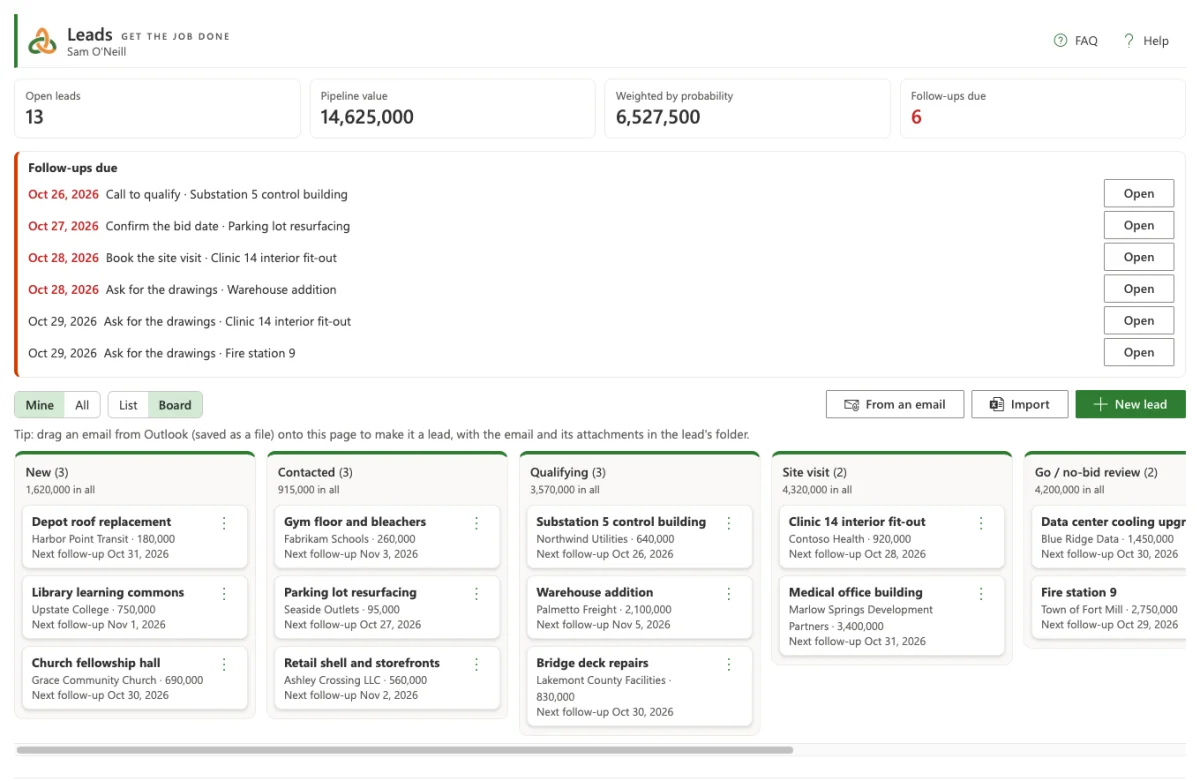
Every bid, from go decision to won or lost
Track each estimate through its stages (estimating, proposal sent, apparent low, won or lost) in the JobsViz Estimating app, with bids due at the top and the figures that matter.
- Bids due in the next two weeks, and bid dates added to Outlook
- A list or a board, with win rate, value bid and value lost
- Set up gives an estimate its own document library from your estimating template and a Teams channel; a lead's documents are copied in
- Bring in estimates from QuickBooks with an exported file
- Convert to a job: the won estimate becomes the job, linked to it, with its documents copied into the job's library and the lead marked won
- Create an estimate and Convert to a job wizards, and an Estimating section in Reports
- Works on its own, or with Leads so the lead, estimate and job stay linked both ways, and the documents follow
The forms a job runs on, built in
Ten construction forms ready on day one, filled in on each job's Forms tab: RFI, Submittal, Transmittal, Daily Report, Meeting Minutes, Change, Punch Item, Inspection, Safety Incident and Notice.
- Numbered per job, with statuses, due dates, comments and revisions you can look back on
- Routed approvals: "ball in court" shows who has it now, and each step is emailed
- Files and photos kept in the job's SharePoint library; link forms to each other
- Print or PDF in your firm's letterhead
- My forms on the PM Dashboard, overdue forms in Needs attention, and a Forms section in Reports
- Bring your existing Excel logs across, and each row becomes a form
- Switch forms on or off, and set their numbering, wording and optional fields
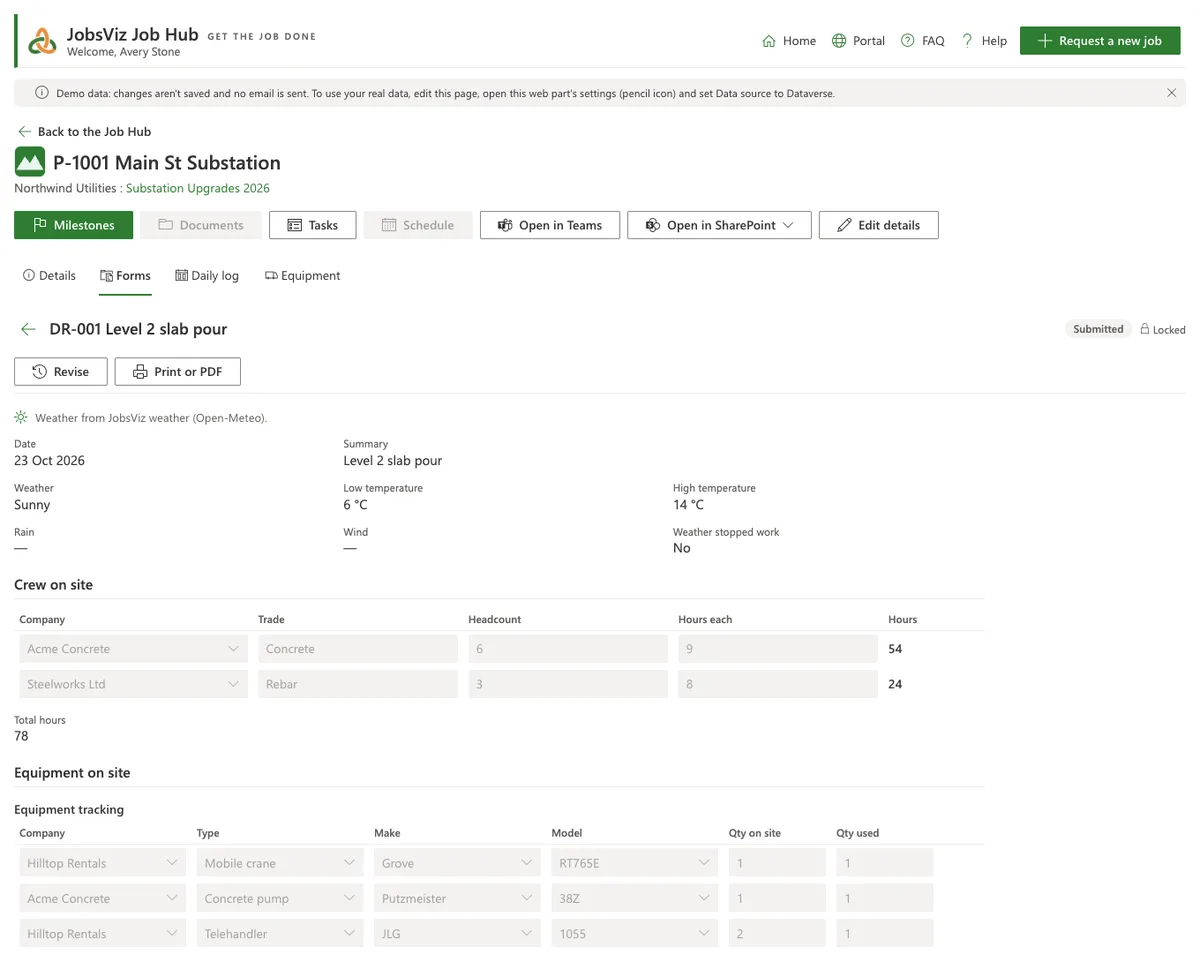
Your own forms, drawn on the page
Turn the paper forms you use today into forms that work just like the built-in ones. The builder's canvas is the form itself: drag fields into place, and pull an edge to change a field's columns or height.
- Start blank, from a gallery of templates, or from a copy of any form
- Text, numbers, money, dates, choices, people, tables, checklists, signatures, calculations and show-only-if rules
- Lookup lists from your Admin lists, your own lists or a SharePoint list
- Auto numbers, star ratings, formats for money, units and phone numbers, colours for choices
- Location fields with address suggestions and a map pin; Photo fields with captions and the photo's position
- A Build a form wizard for a first form, and a Forms guide in Admin
- Needs Forms. Your admins publish; no IT project needed
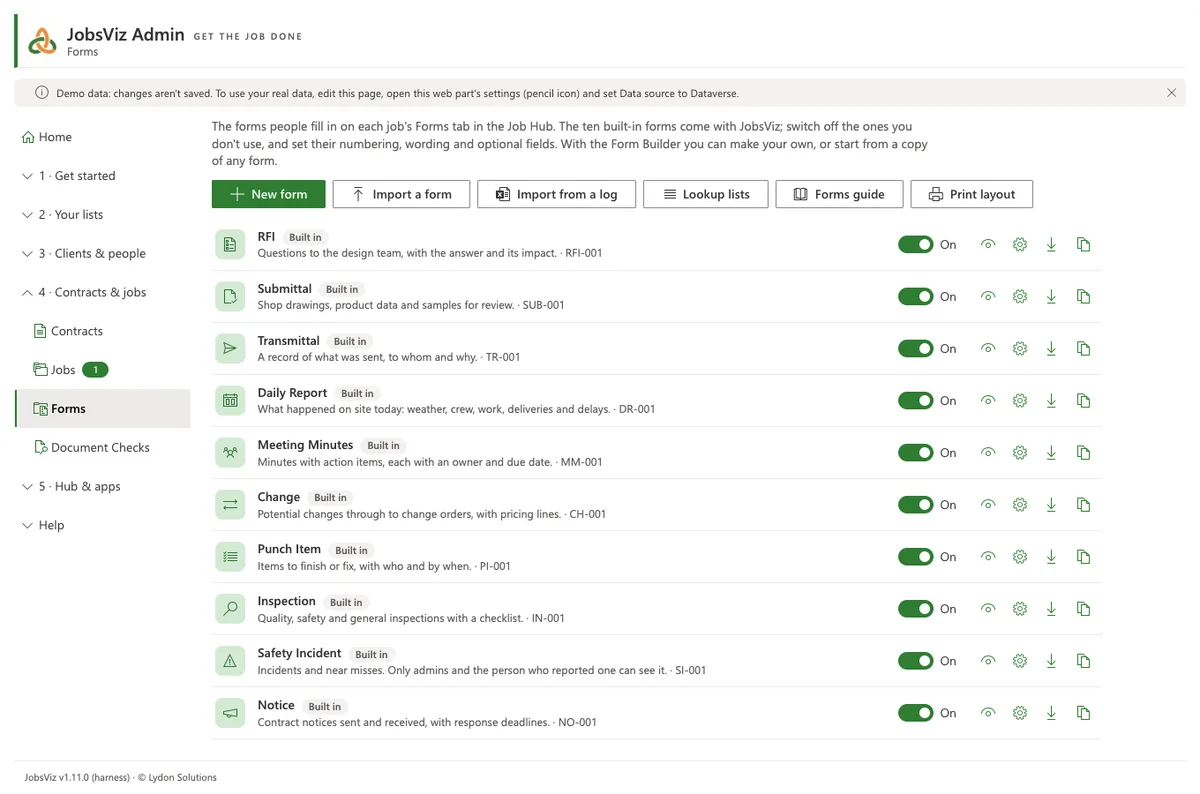
Daily reports in minutes, records for good
The Daily Report fills in what it can and copies the rest from yesterday, so the site team only types what changed.
- Start from the last one: yesterday's crew, work and equipment copied in
- Equipment tracking: company, type, make and model from your equipment catalogue (a starter list is included), with quantities on site and used
- A job's Equipment tab shows days on site and use per machine, or day by day, with Excel or CSV export
- A job's Daily log: every daily form by date; print a week or a month at once
- Make final: lock a form for good as the record, with a PDF copy filed in the job's documents
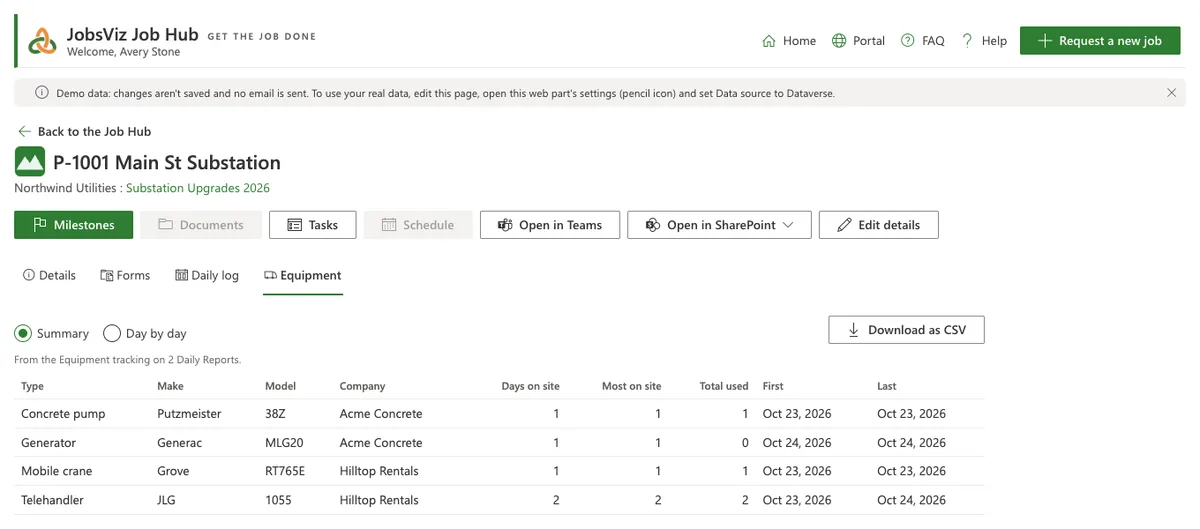
The weather, filled in for you
A new Daily Report fills in the day's conditions, low and high temperatures, rain and wind for the job's place, in your region's units. Each job has a Weather tab with the weather now and the days ahead.
- Change any value by hand, or refresh it
- Use your own OpenWeather key, or the JobsViz Weather add-on with no key to manage
- Only the job's map position and a date are sent to look it up
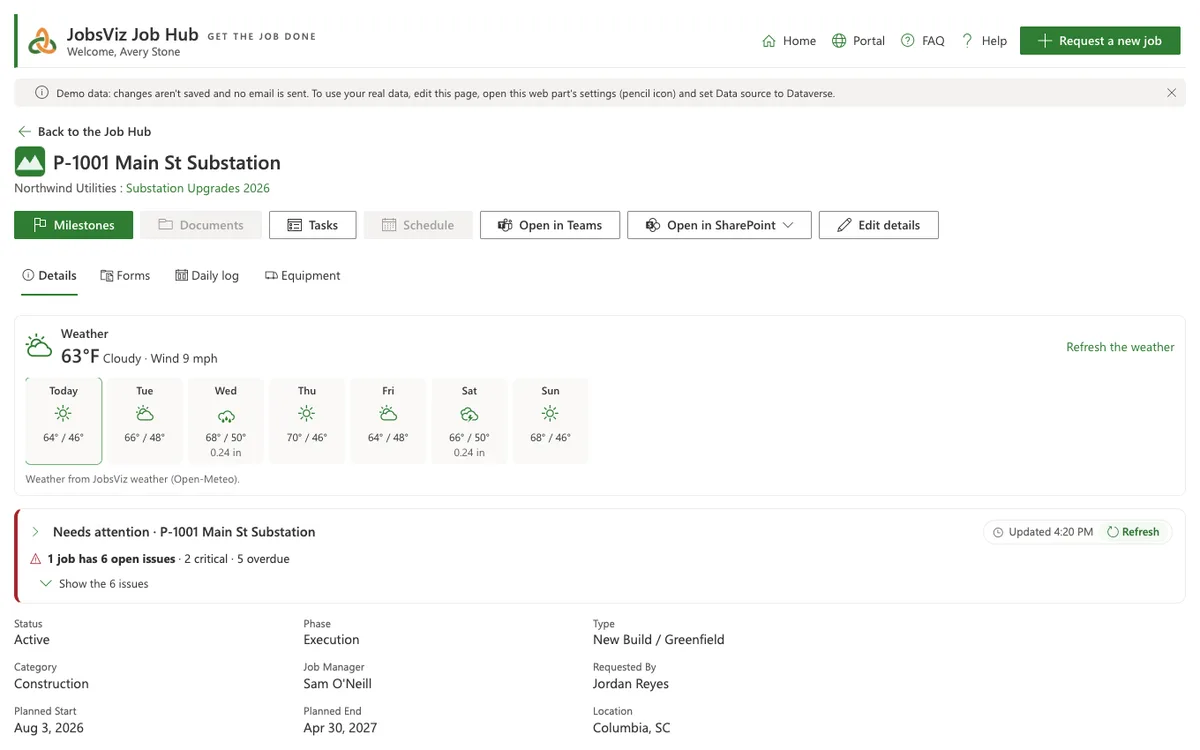
Every job on the map
See where the work is on the Job Hub's Home, on each client and industry, on the PM Dashboard and as a report.
- Filter by client, contract, type, category, phase and status; markers coloured by status
- Draw an area to list the jobs inside it; sort, group and export the list to Excel or CSV with map positions
- Type an address and pick from suggestions, drop a pin, or use your phone's location
- Jobs without a position are listed, not lost; Setup can place existing jobs for you
No keys, no accounts
Maps come from OpenFreeMap with OpenStreetMap data, free and with nothing to set up. Address look-ups can be switched off, so no address ever leaves JobsViz.
JobsViz reads the paperwork so problems don't hide
Document Checks read each job's Excel logs and Word documents, together with the job's own dates, and raise what needs action.
- RFIs awaiting answers, change orders waiting for approval, pay applications
- Insurance certificates about to expire, failed inspections, punch lists
- Safety incidents, delays in daily reports, notices, meeting actions, late milestones
- With Forms, overdue forms and approval steps waiting too long
- Admins set the thresholds; project managers acknowledge, snooze, resolve or dismiss
- Shown on each client and job, in the PM Dashboard and in Reports
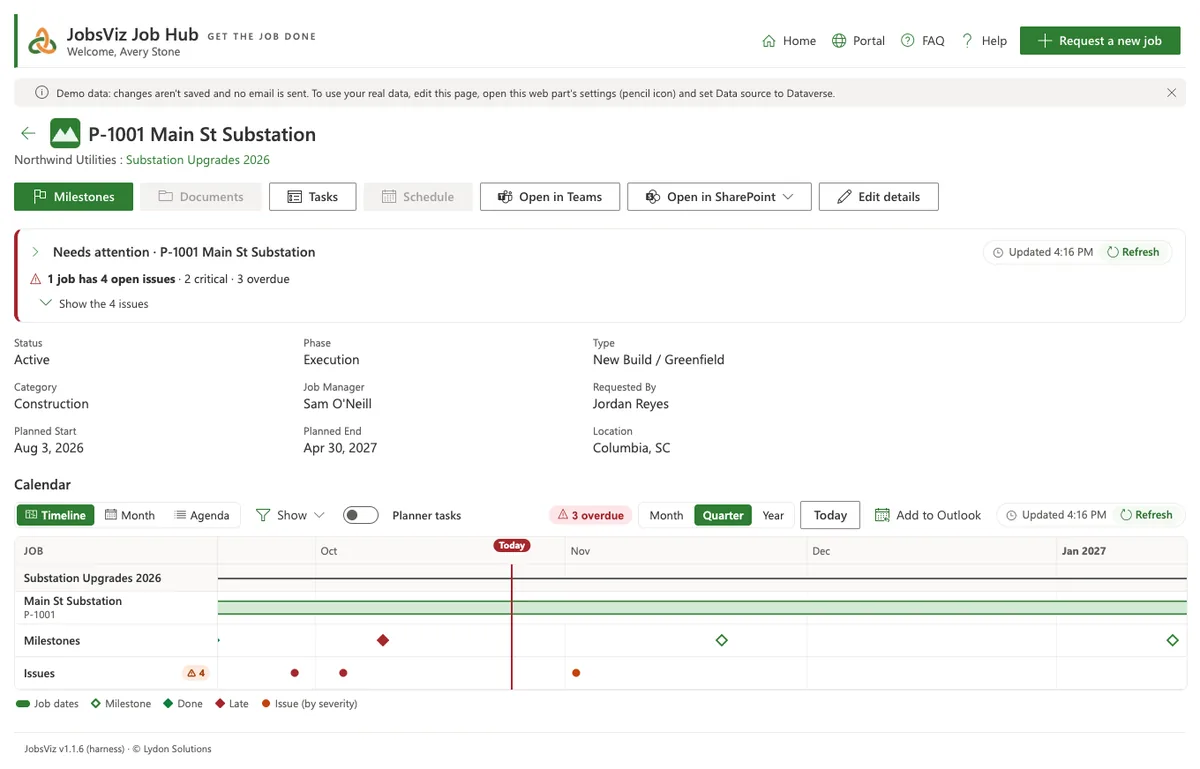
Dates for every job, on one timeline
See jobs, contract dates, milestones and open issues as a timeline, a month or an agenda, for a client or for a single job.
- Planner tasks shown on top, from each job's plan
- Admins and the job's manager drag dates to change them, with Undo
- Add to Outlook as one calendar, one per client, one per job, or in your main calendar
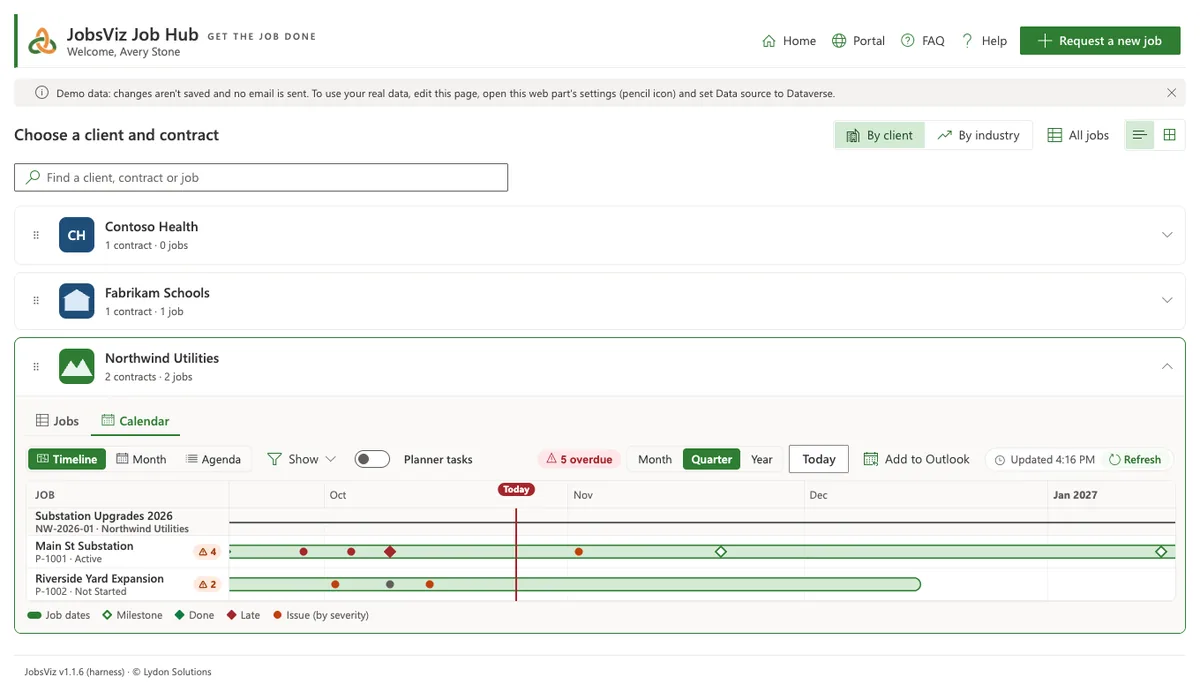
Create a client, contract or job in minutes
Step-by-step wizards ask the questions once and do the rest, including SharePoint sites, Teams channels and who can get in. Nothing is saved until the last step, and if anything fails you can try again from where it stopped.
- Create a client, contract or job; onboard a new client with its first job
- Go straight on from a new client to its contract and job, without choosing them again
- Request a new job (for project managers), approve a request, close out a job (listing its open forms)
- Build a form, with the Form Builder
- Create a lead, Create an estimate and Convert to a job, with Leads and Estimating
- A new job starts with its client's usual category, industry and sector
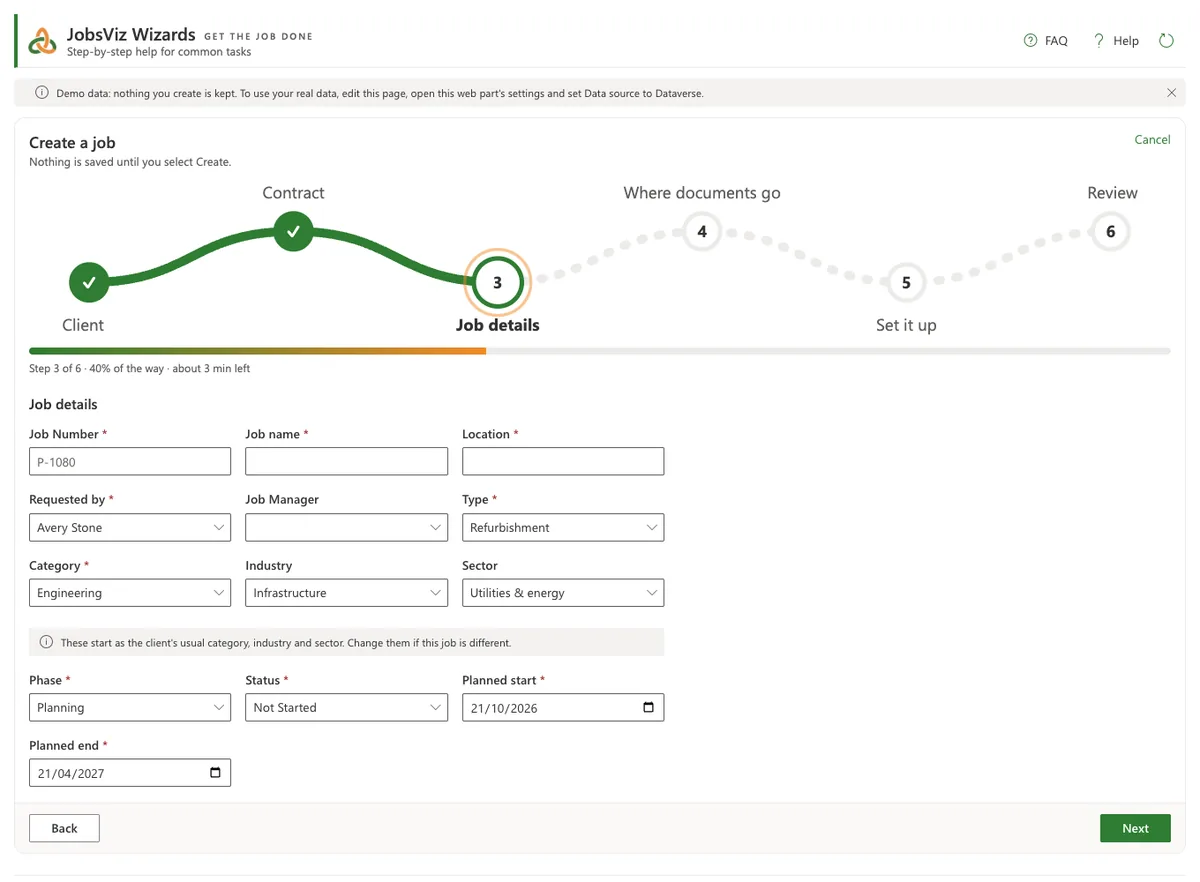
Eighteen reports, ready on day one
Count cards and charts for the whole firm or just your jobs: timeline, period counts, status, phase, funnel, sunburst, treemap, heatmaps, schedule of values, late milestones, contracts ending, Gantt, calendar, year on year, workload, coverage, requests and jobs on the map. Plus a Project issues section, and Forms, Leads and Estimating sections with those modules.
- Click any part of a chart to see the jobs behind it
- One filter for the whole page: client, contract, status, industry, type, phase, job manager and more, set once for every report (and for the whole PM Dashboard); save your own filters, and admins share theirs
- Export the data to Excel or CSV, or the chart as a picture
- Admins choose the reports, order, colours, periods and financial year
- Power BI: your own Power BI reports on a tab beside the charts, and five ready-made Power BI reports on your JobsViz data (portfolio, schedule of values, WBS, change orders, site records)
Set up and run it without IT
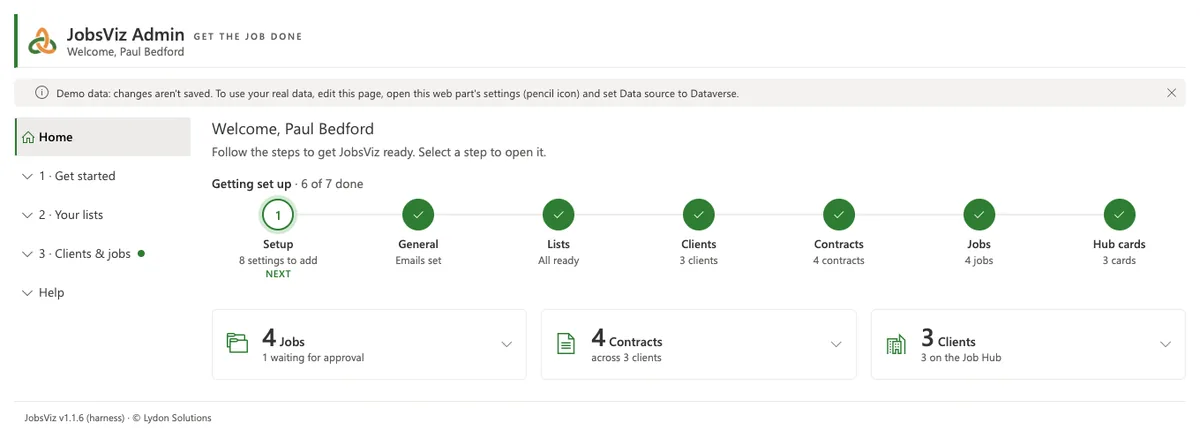
The setup wizard, JobsViz Install, gets you running; Admin is where your JobsViz owners then keep the lists and settings, with a Home that shows how far setup has come and what to do next.
- A setup wizard does the whole install with you: your Dataverse environment, the data tables, your licence, language and words, site layout, template library, lists, people, email and modules. Close the page and it carries on where you left off
- The planning workbook: answer the wizard's questions and list your existing clients, contacts, contracts, jobs, Schedule of Values and template folders in Excel, then upload it and every step starts from your answers
- Your sites, your way: one site, a site per client or a site per job, with or without Teams; every job gets its library from your template, with a 00 Imported documents folder
- Old documents copied from SharePoint, Teams or OneDrive, or uploaded from a folder on your computer, with problems shown before anything is copied
- Steps that need another admin's rights can be emailed to them with Email these steps to…
- Import clients, contacts, contracts, jobs and Schedule of Values from a spreadsheet, see every change first, and undo it
- Setup installs and upgrades the data tables itself, shows what's done and what's left, and opens the wizard at any step
- Clients, contracts, jobs, contacts, types, phases, statuses, industries, companies, equipment and more
- Create SharePoint and Teams sites for clients, jobs and the Job Hub; manage who's in them
- Hide, archive or delete safely, because JobsViz checks what still uses a record first
- View as another person, to see JobsViz the way they do
And the details that make it fit
Your terminology
Jobs or projects, customers or clients, work orders or deliverables. Change the words once and every screen, button and help page follows.
19 languages, local formats
English (US and UK) included, with 18 more as language packs. Dates, numbers, currency and phone checks follow your region, and the guides come in every language too.
Which languages?
French, Spanish, German, Italian, Portuguese, Dutch, Polish, Czech, Slovak, Hungarian, Romanian, Croatian, Slovenian, Greek and the Nordic languages, with Canadian French, Latin American Spanish and Brazilian Portuguese.
Sites your way
One site for everything, a site per client or a site per job, including team sites with Microsoft Teams.
Phones and tablets
Every screen works at phone width, in light or dark, in SharePoint, the SharePoint app or Teams. On a phone, a job's page keeps Back at the top and folds its tabs into a menu.
FAQ and help built in
Each app has its own FAQ and a Help button that sends a request to your JobsViz admins.
Friendly when Microsoft 365 is busy
JobsViz waits and retries when Microsoft 365 asks it to slow down, and keeps saved copies so pages open fast.
Want to see it on your own jobs?
We'll walk you through JobsViz in 30 minutes, or set up a trial in your Microsoft 365.